Introduction
A call analysis by getnextphone reported that 74.1% calls go unanswered and for small businesses, that often means lost revenue, not just missed conversations. Choosing an effective call forwarding service for your business can make your company look professional and responsive. Today's buyers expect instant answers and the right phone setup delivers just that while never letting you miss an important lead. Whether you are a solo hustler or building a team, call forwarding keeps your connections simple yet reliable.
A good system can give you a virtual phone number for small business use, forward calls to mobile devices, route inquiries to the right person and even handle after-hours calls smoothly. The top solutions go beyond basics as they enhance customer experience, keep your growing team organised and smoothen operations.
This guide breaks down the top options and shows you how to pick the one that fits your budget and workflow. Freelancers love simple setups while teams crave advanced routing, voicemail and mobility. No matter the size, the goal is the same: stay reachable, project polish and manage calls effortlessly.
Top 5 Call Forwarding Services for Small Business (2026)
Here are the top call forwarding services for small businesses in 2026 that offer reliable conditional/unconditional forwarding, voicemail transcription and virtual phone numbers.
-
GRASSHOPPER
Key Features: Call Forwarding and Handling, Business Phone Numbers, Business Texting, VoIP and WiFi Calling, Virtual Receptionist (Ruby), AI Transcription and Summaries and Shared Inbox (Conversations)
Pricing: Virtual phone services start at $14/month (annual billing) for a single user, scaling up to $25/month including multiple users and $55/month for small businesses including unlimited extensions and users. Additional costs include a one-time fee for registration, and services like Ruby live receptionist are available for extra charges.
Best for Freelancers, Solopreneurs and small businesses needing a simple, low-cost virtual phone system without per-user complexity.
-
NEXTIVA
Key Features: NextivaONE app, a unifies workspace to coordinate voice, video, text and chat, Unlimited Calling and SMS, Auto Attendant and Routing, Voicemail transcription directly to mail, Omnichannel Communications to manage social media messaging and Intelligent IVR and Routing.
Pricing: Business communication plans start at $15/month per user (annual billing) up to $60/month to include supervisor dashboards. A Digital-Only Track plan is available starting at $20/user/month to support multichannel social media and review management but excludes voice calling.
Best for small to mid-sized businesses seeking a reliable, all-in-one and easy to use cloud communication system.
-
RingCentral
Key Features: AI-Powered Video Meetings, Cloud Phone System (with advanced call management like IVR and Call Forwarding), Team Messaging, Internet Fax, Extensive Integrations to connect with 300+ apps, Advanced Analysis and Reporting.
Pricing: The core service is structured into three price tiers with increasing features - $20/user/month (annual billing) with essential features and 100 toll-free numbers; $25/user/month along with CRM Integrations and the $35/user/month Ultra plan that comes with 10,000 toll-free numbers, and unlimited fax and storage.
Best for small to mid-sized teams that require enterprise grade routing and a unified communication platform.
-
DIALPAD
Key Features: Real-time AI transcription, Voice and VoIP, Automated Call Summaries, Intelligent Call Routing and IVR, Simultaneous Ring and mobile/desktop apps, Call Recording, CRM integrations (Salesforce, HubSpot), and Admin Controls.
Pricing: Small business plans typically start around $15/user/month with AI transcriptions, and higher tiers for CRM Integrations and multi-office management in the $25-$35 range. For outbound teams, it offers plans ranging from $39/user/month up to $170/user/month including AI playbooks and screen recording.
Best for small businesses, particularly companies prioritizing AI-driven voice analytics, strong mobile support and avoiding the complexity of a full contact centre.
-
GOOGLE VOICE
Key Features: Virtual Business Number, Simple Call Forwarding, Voicemail transcription, multi-device linking, Spam Filtering and Blocking, International Calling. Workspace Plans include Auto-Attendant, Ring Groups to allow multiple users share a single line, Call Recording and SIP Link that connects existing carrier phone numbers to the Google Voice System.
Pricing: Offers a free personal version for US users and paid business versions costing $10-$30/user/month depending on Workspace bundling. International calls are charged at varied rates requiring pre-paid credit.
Best for Freelancers and small teams who require a free or low cost and easy setup with strong spam filtering.
| Service | Best for | Key features |
|---|---|---|
| Grasshopper | Freelancers, solopreneurs, very small businesses needing a simple, low-cost virtual phone system | Call forwarding & handling, business phone numbers, business texting, VoIP/Wi-Fi calling, virtual receptionist (Ruby), AI transcription & summaries, shared inbox (Conversations) |
| Nextiva | Small to mid-sized businesses seeking a reliable all-in-one cloud communications system | Unified NextivaONE app (voice, video, text, chat), unlimited calling & SMS, auto-attendant & intelligent routing, voicemail-to-email transcription, omnichannel messaging & review management |
| RingCentral | Small to mid-sized teams that require enterprise-grade routing and a unified communications platform | Cloud phone with advanced IVR/routing, call forwarding, AI video meetings, team messaging, internet fax, advanced analytics & reporting |
| Dialpad | Small businesses prioritizing AI-driven voice analytics and strong mobile support | Real-time AI transcription, automated call summaries, intelligent call routing & IVR, simultaneous ring, mobile/desktop apps, call recording, CRM integrations |
| Google Voice | Freelancers and small teams needing a low-cost, easy setup with strong spam filtering | Virtual business number, simple call forwarding, voicemail transcription, multi-device linking, spam filtering, international calling; Workspace plans add auto-attendant, ring groups, call recording |
What is call forwarding and how can small businesses make use of it?
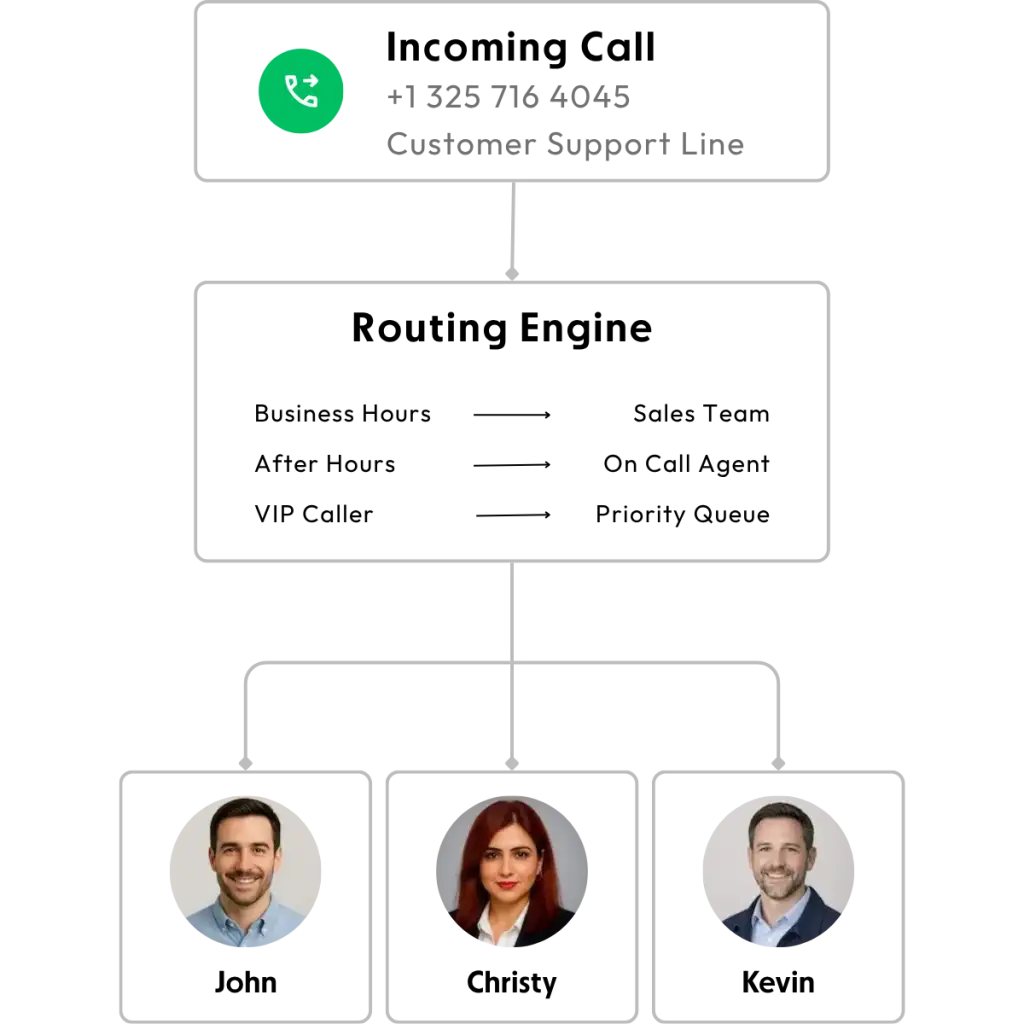
Call forwarding is the ability to send incoming business calls to another number, device or team member instead of letting them ring unanswered. Independent research conducted by Nobelbiz confirmed that 77% of small business owners use call forwarding which supports the idea that it is already a mainstream business communication tool. Instead of giving out a personal mobile number, you can route business calls through a dedicated number that still reaches your phone, office line or app. When choosing a service, it is important that you think about your daily reality. Once you know how your business works, it becomes much easier to choose a system that makes the job simple.
Features to Look for in a Good Call Forwarding Service
In a separate market report by Business Market Insights, the global IVR market was valued at $5.5 billion USD in 2025 and is projected to reach $9.91 billion USD by 2034, showing strong demand for advanced routing and automation. Here are the top features to look for in a good call forwarding service to make your business easier to access and manage.
| Feature | Why it matters | What to look for |
|---|---|---|
| IVR / Auto Attendant | Route callers automatically to the right place without a live | Easy menu setup, business-hours routing, voice recognition |
| Simultaneous Ring | Rings multiple devices at the same time for faster response. | Ringing across mobile, desktop and desk phones at once. |
| Voicemail to Email | Sends voicemail recordings directly to email for quick follow-up. | Audio attachments, caller details and quick playback. |
| Call Recording | Helps with training, quality control and dispute resolution. | Easy access, storage controls and recording notifications. |
| CRM Integration | Syncs call activity with customer records. | Native integrations and auto-logging. |
| Call Routing Rules | Direct calls based on time, team availability and department. | Business-hours routing, after-hours handling and ring groups. |
| Mobile/Desktop App Support | Lets teams answer calls from anywhere securely. | Smooth device switching and reliable notifications. |
Forward by iDevLive is a lightweight alternative worth considering alongside the tools above. Checkout the features provided by Forward.
How to choose the Right Call Forwarding Service
The right call forwarding service depends on business size, call volume and how many moving parts your team has.
- If you are a freelancer, you would need virtual business number, call forwarding and voicemail-to-email. Choose simple, low-cost plans with flat pricing and easy setup (no per-user complexity). This would ensure privacy and keep you connected.
- If you have a small team, choose mid-tier business plans that add ring groups and simple IVR without heavy admin overhead. This reduces transfers, spreads calls across the team and improves first-response times.
- Growing/high-volume operations require advanced call routing, queues, CRM integrations, call recording, reporting, multi-site support. Choose scalable UCaaS or platforms with clear upgrade paths and SLA-backed uptime to prevent missed calls at scale and improve staffing and performance.
- International or multi-region businesses need local or toll-free numbers, time-zone routing, competitive international rates. It is wise to choose providers with global number coverage and regional pricing to avoid expensive forwarding fees.
Businesses comparing these features can also explore solutions and communication tools from iDevLive while evaluating providers.
Frequently Asked Questions
-
What is the difference between call routing and call forwarding?
Call forwarding redirects a call from one number to another while call routing is more advanced since it uses rules to decide where a call should go based on time, location, caller input and team availability.
-
Is call forwarding secure?
Call forwarding is generally secure when you use a reputable business phone provider with encryption, access controls and proper account protections. The main risks usually come from weak passwords, unauthorized call routing changes or using an unsecured device. For best results, choose a trusted provider and enable two-factor authentication and admin controls.
-
How to Set Up Call Forwarding for My Business?
Enable call forwarding through your phone settings or provider code. For VoIP or business phone systems, use the online dashboard or app. Set forwarding rules including voicemail and ring duration. Test the setup to ensure that calls reach the right number. Check voicemail routing if calls go unanswered.
-
How to avoid high costs while call forwarding?
The easiest way to avoid high call forwarding costs is to choose a plan that matches your actual usage, not just the lowest advertised price. Consider cloud-based systems to avoid unnecessary long distance or international forwarding charges. Regularly review your usage to prevent paying for unused features.
-
Is Google Voice enough for a small business?
Google Voice can be enough for freelancers, solo founders or very small teams that need simple call forwarding and good security. It is affordable and easy to set up, but it may feel limited if you need advanced routing or detailed business phone features.
-
Which call forwarding service is best for small business?
Solo founders/freelancers may choose Google Voice or Grasshopper for low-cost, easy setup with a virtual number, call forwarding, voicemail-to-email, and mobile apps. Small teams can consider RingCentral, Nextiva, or Dialpad for business-hours routing, shared numbers, simultaneous ring, and voicemail transcription. Growing/high-volume operations could pick from the above options or might go for a few other options like 8x8, Zoom Phone or Cisco Webex for advanced routing, CRM integrations, call recording and analytics.
Making the Right Call and Choosing the most Fitting Service
Choose the right tool by use case and not by hype. For beginners, simple, low-cost forwarding-first tools like Google Voice or Grasshopper give a virtual number, voicemail-to-email and a mobile app for fast setup and minimal admin. Small teams benefit from mid-tier UCaaS platforms such as RingCentral, Nextiva or Dialpad, which add business-hours routing, shared numbers, simultaneous ring and voicemail transcription to reduce transfers and improve first response. Growing teams should opt for scalable contact-centre-lite platforms (RingCentral, Dialpad, 8x8, Nextiva) that provide advanced routing, queues, CRM integrations, call recording and analytics.
Identify your top three must-have features and preferred monthly budget, then shortlist two providers that match your criteria - one simple and one scalable option. Try running a 7-14 day trial to test real-world call quality, routing and workflows before making the final choice. For businesses focused purely on call routing and distribution